
Accessible Hyperlinks
How to make hyperlinks accessible
Hyperlinks include text links, buttons, menus, and images, and must be clear, descriptive, and functional.
Web Content Accessibility Guidelines (WCAG) states:
- Every link should include clear clickable text and a working destination. If using an image as a link, include text alongside it so users know where it goes.
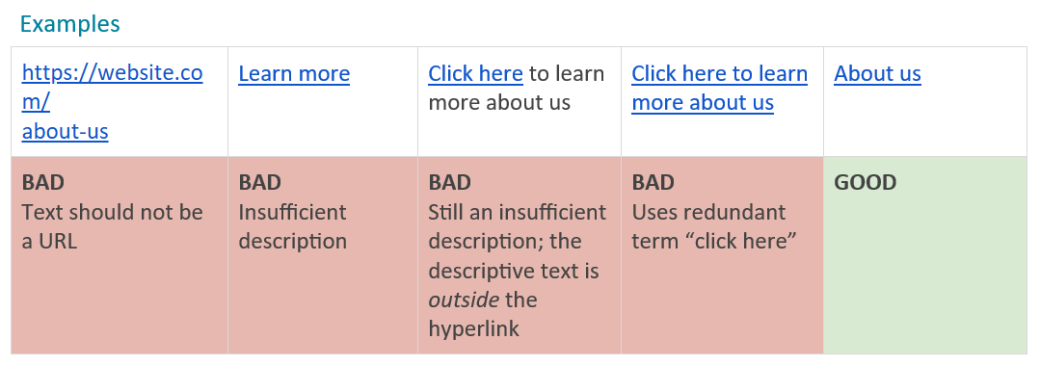
- Link text should clearly explain what the user will open, even if it’s read on its own. For example, use “Our Services” instead of “Learn more.” What is the user learning more about?
- Avoid generic phrases like “click here” or “link to,” since the link text itself should already explain the destination.
- Whenever possible, use friendly, readable text instead of displaying the full URL (for example, “About Us” instead of website.com/about-us).
- Make sure all links work properly and go to the correct page, website, or section.
- Avoid placing multiple links next to each other that go to the same place, as this can create unnecessary repetition for some users.
Important note about WAVE:
For faster remediation, install the WAVE browser extension to help pinpoint the exact elements causing accessibility issues.
Common hyperlink accessibility violations:
Suspicious Link Text
What It Means:
Link text contains extraneous text or may not make sense out of context.
Why It Matters:
Links, which are often read out of context, should clearly describe the destination or function of the link. Ambiguous text, text that does not make sense out of context, and extraneous text (such as “click here”) can cause confusion and should be avoided.
How To Fix It:
Where appropriate, reword the link text so that it is more descriptive of its destination when read out of context. Remove any extraneous text (such as “click here”).
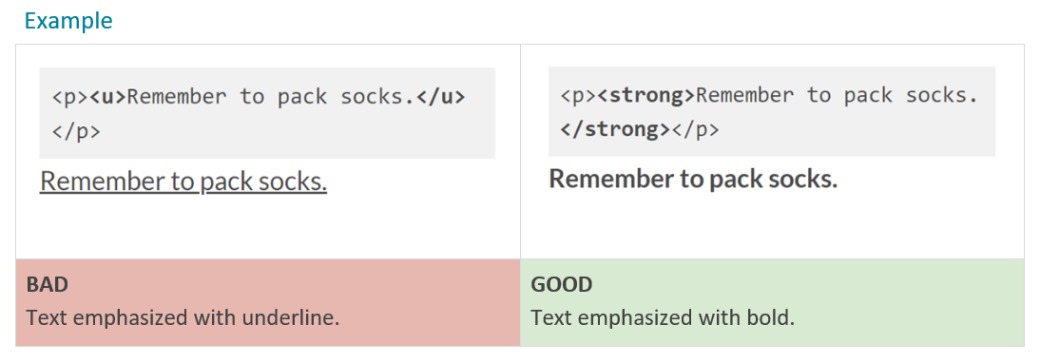
Underlined Text
What It Means:
Underlined text is present, but it doesn’t contain a link.
Why It Matters:
Underlines almost universally indicates linked text. Remove the underline from the non-link text. Other styling (e.g., bold or italics) can be used to differentiate the text.
How To Fix It:
Unless there is a distinct need for the underlined text, remove the underline from it.